Thursday, January 13, 2011

Dynamically Add/Remove rows in HTML table using JavaScript

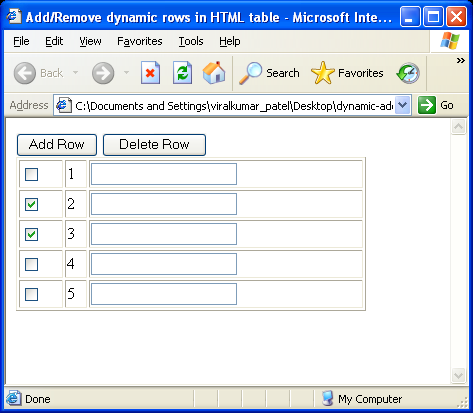
This is very often for web developer when we need to use dynamically generate HTML table using JavaScript. I have found frequent request in various forum about this issue...so now there is very easy sample for them...


Demo:
Click here

Source code :(Html & JavaScript)

<HTML>
<HEAD>
<TITLE> Add/Remove dynamic rows in HTML table </TITLE>
<SCRIPT language="javascript">
function addRow(tableID) {

var table = document.getElementById(tableID);

var rowCount = table.rows.length;
var row = table.insertRow(rowCount);

var cell1 = row.insertCell(0);
var element1 = document.createElement("input");
element1.type = "checkbox";
cell1.appendChild(element1);

var cell2 = row.insertCell(1);
cell2.innerHTML = rowCount + 1;

var cell3 = row.insertCell(2);
var element2 = document.createElement("input");
element2.type = "text";
cell3.appendChild(element2);

}

function deleteRow(tableID) {
try {
var table = document.getElementById(tableID);
var rowCount = table.rows.length;

for(var i=0; i<rowCount; i++) {
var row = table.rows[i];
var chkbox = row.cells[0].childNodes[0];
if(null != chkbox && true == chkbox.checked) {
table.deleteRow(i);
rowCount--;
i--;
}

}
}catch(e) {
alert(e);
}
}

</SCRIPT>
</HEAD>
<BODY>

<INPUT type="button" value="Add Row" onclick="addRow('dataTable')" />

<INPUT type="button" value="Delete Row" onclick="deleteRow('dataTable')" />

<TABLE id="dataTable" width="350px" border="1">
<TR>
<TD><INPUT type="checkbox" name="chk"/></TD>
<TD> 1 </TD>
<TD> <INPUT type="text" /> </TD>
</TR>
</TABLE>

</BODY>
</HTML>

You can get more help from here.

Get URL Parameters (QueryStrings) using Javascript

Today I have got a request from a newbie .."How to get value from Querystring using Javascript in asp.net?" So I want to share with you ....

Unfortunately there is no method in JavaScript for parsing the querystring to get the value. So we try with regular expression to solve this problem..

JavaScript method for get URL parameter(QueryStrings)

function getQuerystring(key, default_)
{
if (default_==null) default_="";
key = key.replace(/[\[]/,"\\\[").replace(/[\]]/,"\\\]");
var regex = new RegExp("[\\?&]"+key+"=([^&#]*)");
var qs = regex.exec(window.location.href);
if(qs == null)
return default_;
else
return qs[1];
}
The following javascript code snippet facilitates Javascript's built in regular expressions to retrieve value of the key. Optionally, you can specify a default value to return when key does not exist.

Example:
The getQuerystring function is simple to use. Let's say you have the following URL:

http://www.dotentboss.com?author=ahsan

and you want to get the "author" querystring's value:

var author_value = getQuerystring('author');

Wednesday, January 12, 2011

How to generate ASCII Table

Very recently I get some request about ASCII code generate.
So that I share with this code...

using System;
using System.Web.UI;

public partial class _Default : Page
{
protected void Page_Load(object sender, EventArgs e)
{
Response.Write("<table><tbody<tr>
<td>Decimal</td><td>ASCII character
</td><td>Hexadecimal</td></tr>\n");
int min = 0;
int max = 128;
for (int i = min; i <>// Get ascii character.
char c = (char)i;

// Get display string
string display = string.Empty;
if (char.IsWhiteSpace(c))
{
display = c.ToString();
switch (c)
{
case '\t':
display = "\\t";
break;
case ' ':
display = "space";
break;
case '\n':
display = "\\n";
break;
case '\r':
display = "\\r";
break;
case '\v':
display = "\\v";
break;
case '\f':
display = "\\f";
break;
}
}
else if (char.IsControl(c))
{
display = "control";
}
else
{
display = c.ToString();
}
// Write table row
Response.Write(string.Format("<tr><td>{0}</td>
<td>{1}</td><td>{0:X2}</td>
</tr>\n", i, display));
}
Response.Write("</tbody></table>");
}
}

Tuesday, January 11, 2011

Open new window with Response.Redirect() in Asp.net- 3rd part

In 2nd part of the following post I show you how to open a new window in asp.net using "ResponseHelper "class. Now today I want to share another approach with "Extension method".

Third approach(Extension method)
public static class ResponseHelper {
    public static void Redirect(this HttpResponse response,
        string url,
        string target,
        string windowFeatures) {
 
        if ((String.IsNullOrEmpty(target) ||
            target.Equals("_self", 
StringComparison
.OrdinalIgnoreCase)) &&
                         String.IsNullOrEmpty(windowFeatures)) {
 
            response.Redirect(url);
        }
        else {
            Page page = (Page)HttpContext.Current.Handler;
            if (page == null) {
                throw new InvalidOperationException(
                    "Cannot redirect to new window outside
Page context."
);
            }
            url = page.ResolveClientUrl(url);
 
            string script;
            if (!String.IsNullOrEmpty(windowFeatures)) {
                script = @"window.open(""{0}"", ""{1}"",
""{2}"");"
;
            }
            else {
                script = @"window.open(""{0}"", ""{1}"");";
            }
 
            script = String.Format(script, url, target,
windowFeatures);
            ScriptManager.RegisterStartupScript(page,
                typeof(Page),
                "Redirect",
                script,
                true);
        }
    }
}

Note the 'this' keyword in the first parameter.
Now whenever we include the namespace this class
is defined within, we get a nice override on the
actual Response object.

Ex:
Response.Redirect("popup.aspx", "_blank", "menubar=0,width=100,height=100");

Thursday, January 6, 2011

Open new window with Response.Redirect() in Asp.net- 2nd part

In my previous post I show you how to open a new window in asp.net using "aspnetForm.target".

Second approach(Using ResponseHelper class)

public static class ResponseHelper {
    public static void Redirect(string url, string target,
string windowFeatures) {
        HttpContext context = HttpContext.Current;
 
        if ((String.IsNullOrEmpty(target) ||
            target.Equals("_self", 
StringComparison
.OrdinalIgnoreCase))
&&
String.IsNullOrEmpty(windowFeatures))
{
             context.Response.Redirect(url);
        }
        else {
            Page page = (Page)context.Handler;
            if (page == null) {
                throw new InvalidOperationException(
                    "Cannot redirect to new window outside
Page context."
);
            }
            url = page.ResolveClientUrl(url);
 
            string script;
            if (!String.IsNullOrEmpty(windowFeatures)) {
                script = @"window.open(""{0}"", ""{1}"",
""{2}"");"
;
            }
            else {
                script = @"window.open(""{0}"", ""{1}"");";
            }
 
            script = String.Format(script, url, target,
windowFeatures);
            ScriptManager.RegisterStartupScript(page,
                typeof(Page),
                "Redirect",
                script,
                true);
        }
    }
}


Now you can just call ResponseHelper.Redirect, first parameter is desired "url", second parameter is for specify a target to be "_self" or "_blank" and third parameter is "windowFeatures" by which you can specify whether the new window should have a menu bar, and what its width and height are.

Disclaimers:

Note: If you use it outside the context of a Page request, you can't redirect to a new window. The reason is the need to call the ResolveClientUrl method on Page, which I can't do if there is no Page. I could have just built my own version of that method, but it's more involved than you might think to do it right. So if you need to use this from an HttpHandler other than a Page, you are on your own.

Note: Beware of popup blockers.

Note: Obviously when you are redirecting to a new window, the current window will still be hanging around. Normally redirects abort the current request -- no further processing occurs. But for these redirects, processing continues, since we still have to serve the response for the current window (which also happens to contain the script to open the new window, so it is important that it completes).

Tuesday, December 28, 2010

Open new window with Response.Redirect() in Asp.net

Today I want share with you a very interesting tips using Response.Redirect(). In asp.net there are various ways to move from one page to another. Mostly used.
  1. Response.Redirect()
  2. Server.Transfer()
 But unfortunately you cant open a new window with those two methods. Which is possible with anchor link like <a href="#" target="_blank" >. When goggling I find that most of the answer is it is not possible or to make it possible you would add JavaScript method to using it. But I don't want this, at last I found two approaches. Now I want to share with these two approaches with asp.net  Response.Redirect() and  Server.Transfer().

First approach(easiest way):

Just use the OnClientClick event of the button. 
<asp:Button ID="btnHome" runat="Server" CssClass="button" Text="Go home"
OnClick="btnHome_Click" OnClientClick="aspnetForm.target ='_blank';"/>
protected void btnHome_Click(object sender, EventArgs e)
{
    Response.Redirect("Home.aspx");
}

If you want to access the form inside the Master page to Child page level

Button1.OnClientClick=string.Format("{0}.target='_blank';",((HtmlForm)Page.Master.FindControl("form1")).ClientID);

This code will find the controls collection and find your form and allow you to get access to the client id so you can be sure you have proper naming of it for the JavaScript to function correctly. Make sure you replace "form1" with whatever you have your parent form id="name" set to inside your Master’s page markup.

For multiple buttons on a single page and only want a specific button to launch into a new window.

<asp:Button ID="btnHomePage" runat="Server" CssClass="button" Text="Your home"
OnClick="btnHomePage_Click" OnClientClick="aspnetForm.target ='_self';"/>

protected void btnHomePage_Click(object sender, EventArgs e)
{
   //Do normal code for postback
}

For more details.visits

In next post I will share with you another approach to open new window using response.redirect() insha Allah.

Presentation @ Microsoft Talkz in AIUB

Yesterday I had joined a nice seminar at AIUB(American International University Bangladesh) arranged by Microsoft which is titled by "Microsoft Talkz". I amazed to see the interest of students at that seminar. Huge crowd in  the auditorium some students were waiting outside the hall for entrance but no single space is available for accommodate them.Really a new experience for me. I feel lucky to get the opportunity to participate that event.

Microsoft student partner(MSP) did a very good job to organize the whole event very nicely. There were also some expert technical guys discuss with new Microsoft technologies.

Razor new view engine in asp.net was my presentation topic. One can download it from here: Razor view engine in asp.net .

Method 'StartWorkflowOnListItem' in type 'Microsoft.SharePoint.WorkflowServices.FabricWorkflowInstanceProvider'

Exception: Method 'StartWorkflowOnListItem' in type 'Microsoft.SharePoint.WorkflowServices.FabricWorkflowInstanceProvider'...